CCTV Cameras in Somerset West: A Practical Buyer’s Guide for Clear, Evidence-Ready Footage
CCTV is the difference between guessing and knowing. For homes and businesses in Somerset West, clear night footage, reliable storage, and secure remote access are what actually matter. This guide shows you how to specify a system that works in real Helderberg conditions—wind, rain, salt air, load-shedding—and stands up when evidence is needed.
What CCTV should achieve
- Verify: human/vehicle detection to cut false alerts.
- Deter: visible cameras, good lighting, and signage.
- Investigate: footage with enough detail to identify faces, clothing, and number plates.
- Manage operations: tills, stockrooms, entrances, parking.
Night-time clarity: lenses, light, and settings
1) Choose the right lens for the distance
- Driveways/entrances (8–12 m): 2.8–4 mm lens for a wide view.
- Walkways/gates (12–20 m): 4–6 mm.
- Number plates (15–30 m): 8–12 mm+ tightly framed. Use a dedicated plate camera paired with an overview camera.
2) Colour-at-night vs IR
- Colour-at-night delivers better identification if there’s consistent ambient light (porch lights, bollards).
- IR is reliable in darkness but can wash out plates; angle the camera away from reflective surfaces and set WDR (wide dynamic range).
3) Control the light
- Add fixed, low-glare lighting near critical zones.
- Avoid pointing cameras directly at bright lights or passing headlights.
- In coastal areas (Strand/Gordon’s Bay), clean housings regularly—salt haze softens images.
Placement that works (by property type)
Homes
- Gate/driveway, front door, back door, patio, side alleys.
- Pair a plate cam at the entrance with a door-height face cam.
Retail & offices (Somerset Mall precinct, Paardevlei)
- Entrances, POS/tills, stockroom doors, loading bays, staff entrances, parking.
- Keep cameras at face height near entrances; mount higher only for overviews.
Estates/HOAs & business parks
- Vehicle and pedestrian gates, perimeter choke points, bin yards, visitor bays.
- Standardise camera heights and lens presets for consistent evidence.
Storage, power, and networking
- NVR with PoE is stable and simple; Wi-Fi only for unavoidable runs.
- Size storage for 14–30 days at your chosen resolution and frame rate.
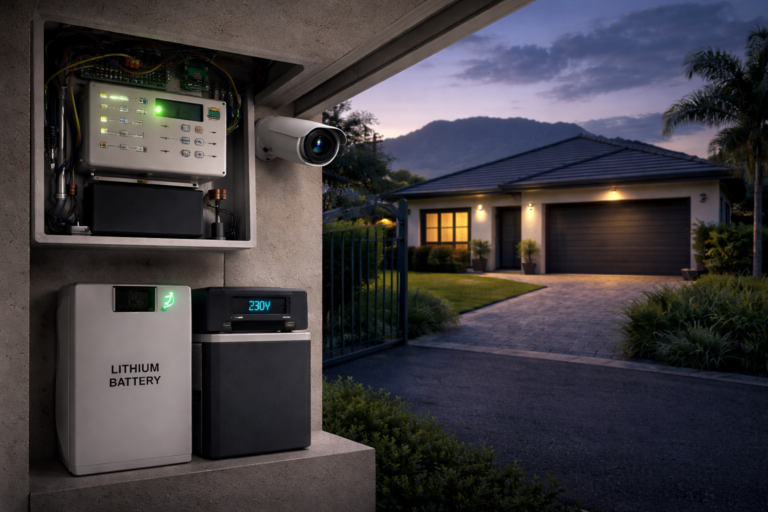
- UPS/backup for NVR, cameras (via PoE switch), router and ONT—plan for load-shedding runtimes.
- Keep the recorder in a locked cabinet; restrict who can export footage.
Smart analytics that reduce noise
- Enable human/vehicle filtering on key zones.
- Create trip lines (e.g., crossing the gate line after 22:00).
- Use push alerts only for high-value events; record everything else passively.
POPIA basics (practical, not legal advice)
- Put up clear CCTV signage where applicable.
- Maintain an access log for who can view or export footage.
- Define a retention period (e.g., 30 days) aligned to storage capacity and business needs.
- Have a simple evidence handover protocol for SAPS requests.
Cyber-secure remote viewing
- Change default passwords; use unique, strong credentials.
- Turn on two-factor authentication in the app.
- Keep firmware up to date; avoid exposing the NVR directly to the internet—use secure cloud relay or VPN.
- If possible, place cameras/NVR on a separate VLAN.
Integrate with your perimeter
Great CCTV becomes exceptional when paired with reliable access control. Link your entrance camera views with a robust gate setup to reduce tailgating and improve incident response. See Gate Motor Somerset West for options that work well with camera systems.
What a professional site survey includes
- A lens-by-lens plan with distances and fields of view.
- Lighting audit and recommendations for colour-at-night.
- Storage and UPS calculations for chosen settings.
- Mounting hardware and cable route map (with surge protection).
- A short POPIA checklist (signage, retention, user access).
Quick checklist (save this)
- Dedicated plate camera at entrance
- Face-height camera at main door
- Fixed lighting at key zones
- NVR + PoE + UPS sized for load-shedding
- Human/vehicle analytics on zones
- Signage up; retention set to 14–30 days
- App with 2FA; passwords unique
- Locked recorder cabinet; export protocol
FAQs
How many cameras do I need for a typical home?
Usually 4–6: driveway/entrance, front door, back door, patio, and a side alley. Larger plots or corner properties may need more.
Can I read number plates at night?
Yes—if you dedicate a plate camera with the right lens and shutter settings, plus controlled lighting, and angle it to avoid headlight glare.
How long should I keep footage?
Most homes and small businesses keep 14–30 days. Extend retention for high-risk operations if storage allows.
Will the system work during load-shedding?
It will if the UPS/backup is correctly sized for your NVR, PoE switch, router, and ONT. We calculate this during the survey.
Can I view cameras on my phone without risking security?
Yes—use the official app with 2FA, keep firmware updated, and avoid open port-forwarding where possible.